HAND HELD HALO DATALOGGING

HAND HELD HALO DATALOGGING
We provide Computer OBDI (OBD1) & OBDII (OBD2) ECU datalogging data logger instructions, cables and software solutions for diagnostic and performance monitoring of Mitsubishi 3000GT, GTO, Dodge Stealth, DSM, 3000 GT, VR4, 3si, Eagle Talon TSI, Eclipse, 3sx, EVO and Galant Cars plus many more European and Asian vehicles. We also provide Backup Service and Repair Manuals for Mitsubishi 3000GT, GTO, Dodge Stealth, DSM, 3000 GT, 3Si, Eagle Talon, Eclipse, Galant, Mitsubishi FTO, Nissan 300ZX and Nissan Skyline Cars. As featured in TOTAL EVOLUTION Performance Car Magazine.
PRODUCTS
'New HHHD website for 2021'
We're currently in the middle of a long overdue website redesign as we've been running with the same website since 2004. A great deal has changed in the intervening years and our old site was no longer mobile or tablet friendly. The product pages will start to reappear over time along with the Forum FAQ page and a completely redesigned online store. Thank you for your patience.
'All kits are now made to order'
As we primarily supply into the International but very niche 3Si Community we have taken the decision to produce kits to order. This prevents having to sit with both raw material or finished goods stock. As a consequence a 10-day production lead time is quoted in our online store. Please note that your kit will be dispatched on the 10th day after the date of purchase. Overseas delivery times will then apply and can vary from 2-3 days within the UK up to 10-days for Asia and the USA. Please take this in to consideration when making your order.
'HHHD Forum offline'
Regrettably the Hand Held Halo Datalogging Forum is now permanently offline. There were a number of factors in the decision making process but the primary driver was the fact our web hosting provider updated their SQL Database version which would have meant migrating the forum to another host or platform along with the associated increased costs. In addition to that there already a large number of very useful resources available for automotive and 3Si enthusiasts which have a greater footfall and wealth of community support. Perhaps the most used part of our forum was the FAQ which will still be available on this website. Thank you for your understanding.
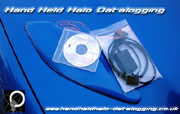
Hand Held Halo Multi OBDII Datalogger
Compatible with approximately 95% of all vehicles that support the following OBDII Protocols:
» ISO15765-4 (CAN)
» ISO14230-4 (KWP2000)
» ISO9141-2
» J1850 VPW
» J1850 PWM

Software Demo's
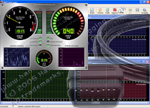
Download our demos with 3x active sensors to checkout the software's functionality and features before you buy. If you have your own datalogging cables you can purchase our software as a direct download. Below is a list of a few of the features you can explore:
» Real-time Sensor Monitoring
» Display & Clear Diagnostic Trouble Codes
» Reset Engine Check Light
» Oxygen (Lambda) Sensor Monitoring
» Real-time Performance Datalogging
» Real-time gauges
» Graphical overlays to compare data sets
» Export Session Data
Download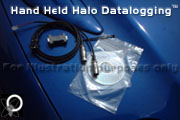
Hand Held Halo Serial OBDI Datalogging Kit (USB and Auto On/Off Optional)
Compatible with the following vehicles:
» 1990-93 MKI Mitsubishi 3000GT/GTO or Dodge Stealth
» 1990-94 Eagle Talon, Mitsubishi Eclipse, Plymouth Laser
» 1991-92 Galant VR-4
» 1993 Mitsubishi Lancer GTI 16v
» 1989-92 Colt, Summit & Mirage (CSM)
» 1992-95 Mitsubishi Evo I, II & III* (*12-PIN Non-powered)
* Many 1990-1995 Mitsubishi vehicles fitted with a 12-PIN OBDI diagnostic port (please check port compatibility before buying)
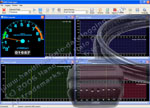
Hand Held Halo Hybrid OBDII Datalogging Kit
Compatible with the following vehicles:
» 1994-99 Jap/European 3000GT/GTO
» 1994-99 Mitsubishi EVO III->VI
» 1994-95 USA 3000GT/VR4 or Stealth
» 1994-95 Talon, Eclipse or Laser (DSM)
» 1996-99 Mitsubishi Galant/VR4/Legnum
» 1997-99 Mitsubishi Colt/Mirage
» 1994-99 Mitsubishi FTO